Recognize what needs attention
Which ingredients should be used first?
 Freshlings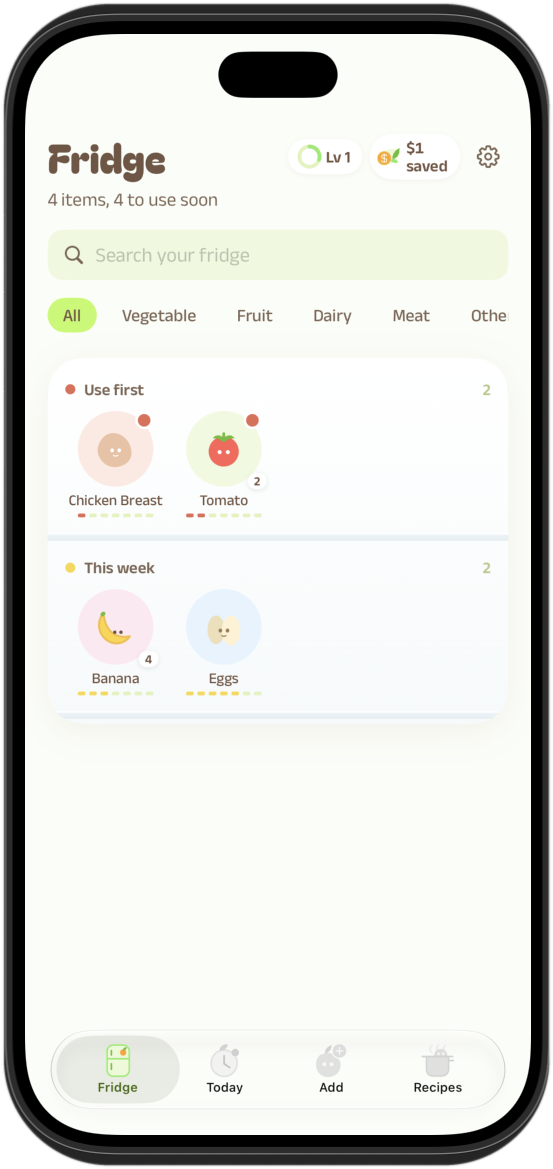
An iOS food management app designed to make food tracking and everyday meal decisions easier.
Use what you have. Know what to use first.
A food inventory is only useful when it supports a decision. Simply listing ingredients does not tell someone what needs attention, what they could cook, or how to keep their records updated without extra work.
These three challenges guided the product experience and its core interactions.
Which ingredients should be used first?
What could someone make with the food they have?
How can adding and updating food stay manageable?
Design opportunity: Move from recording food to choosing what to use, cook, or update next.
A connected product experience: capture food, understand what is available, recognize daily priorities, then take action. These describe complementary tasks—not a rigid sequence every user must follow.
Enter food and review editable information before saving.
Browse available ingredients and their status.
Highlight time-sensitive food and keep progress accessible.
Connect ingredients with possible meal options.
Search, filter, inspect and use ingredients; urgency groups organize the inventory.
Review time-sensitive items, choose a next step, and access progress.
Enter or scan food, then review and confirm its expiration date before saving.
Explore fridge-matched suggestions, save personal recipes, and preview community content (the community feature is a demo in the documented prototype).
Built around SwiftUI TabView with a NavigationStack for each destination. A food-focused action can open Recipes with that ingredient already selected.
An early prototype received feedback from approximately 20 peers in a facilitated review. Faculty feedback identified overlapping Today and Impact responsibilities, prompting the team to simplify navigation. After implementing the core screens, I independently used the app for one week to identify and refine interaction friction.
Feedback → decision: Reviewers found the original Fridge too crowded and unclear. We simplified the layout and ordered ingredients by how urgently they need to be used.
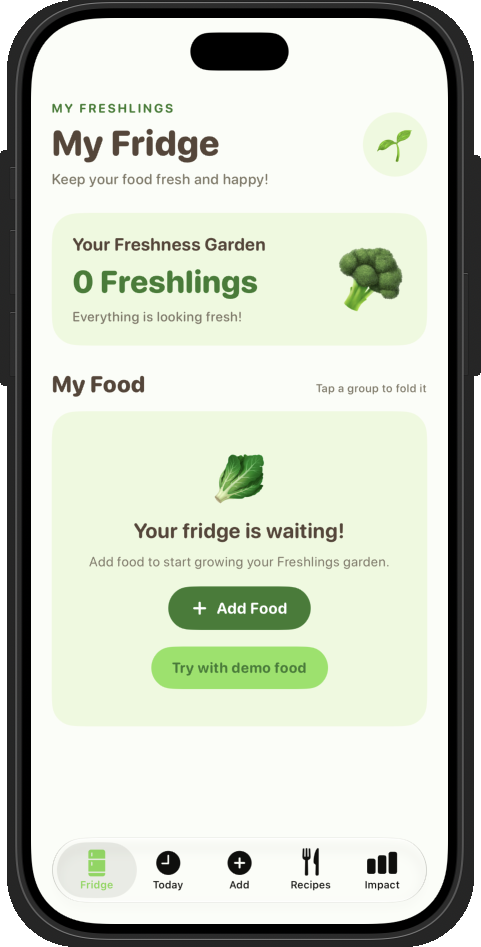
Feedback → team change: Today repeated Fridge priorities, while Impact overlapped with daily progress. Faculty feedback prompted the team to consolidate Today and Impact. The team integrated progress within Today and clarified each destination’s purpose.
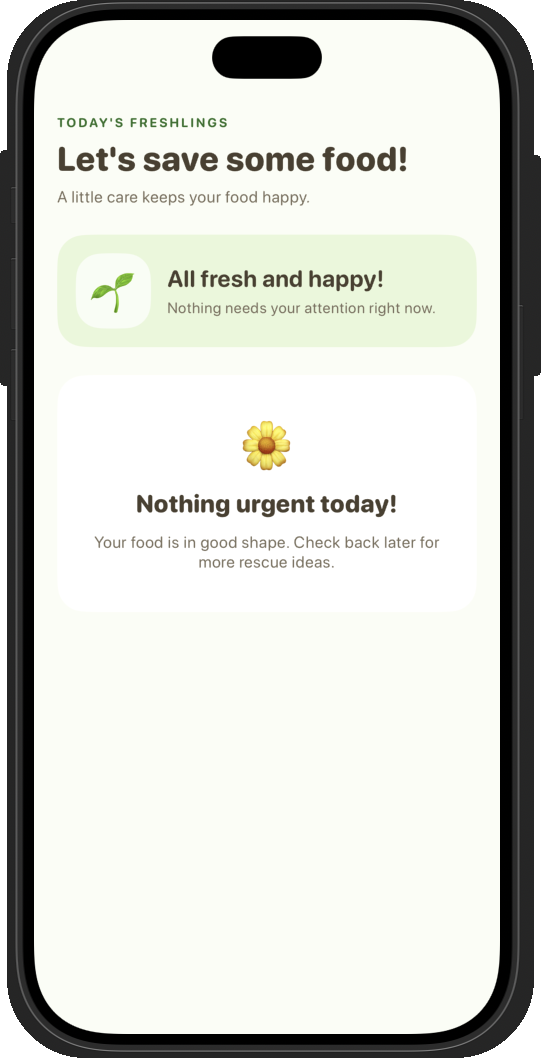
Four task-focused experiences in the working prototype: Fridge, Today, Add Food, and Recipes. The following screens and the three-state Add Food flow show what the product does, while implementation details appear later.
The next section shows task-level screens and the detailed Add Food flow.
Fridge surfaces urgency; Today highlights the day’s next steps; Add Food keeps item details editable; Recipes turns available ingredients into meal options.
Rather than presenting all ingredients as equally important, the Home / Fridge screen separates “Use first” from “This week.” Category filters remain available without competing with the primary priority signal.
Make priority a visual grouping, not a calculation users have to perform mentally.
Adding food uses two main phases: select or scan an item, then review the suggested expiration date before saving. The date stays editable; the code lookup is a convenience, not a substitute for user confirmation.
A date suggestion is a convenience, not an authoritative freshness judgment. Explicit date review keeps the user in control; the documented save flow also includes Undo.
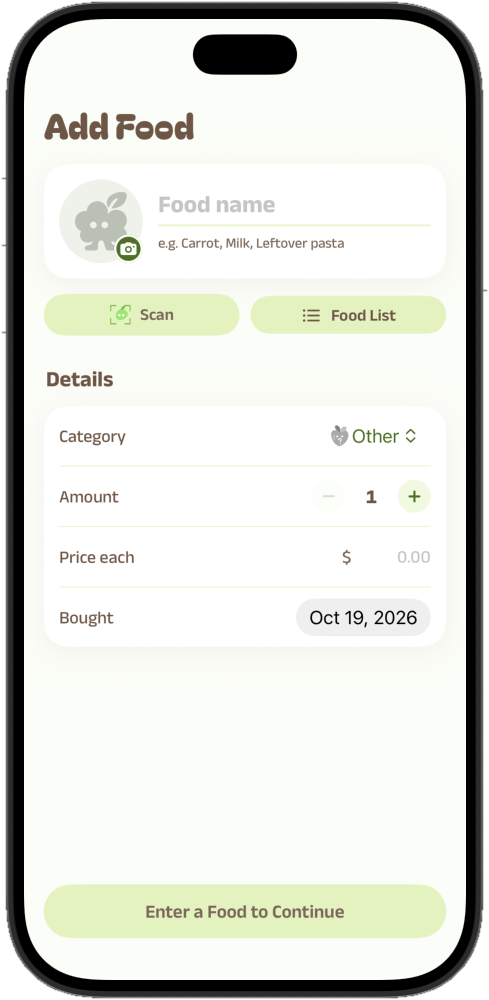
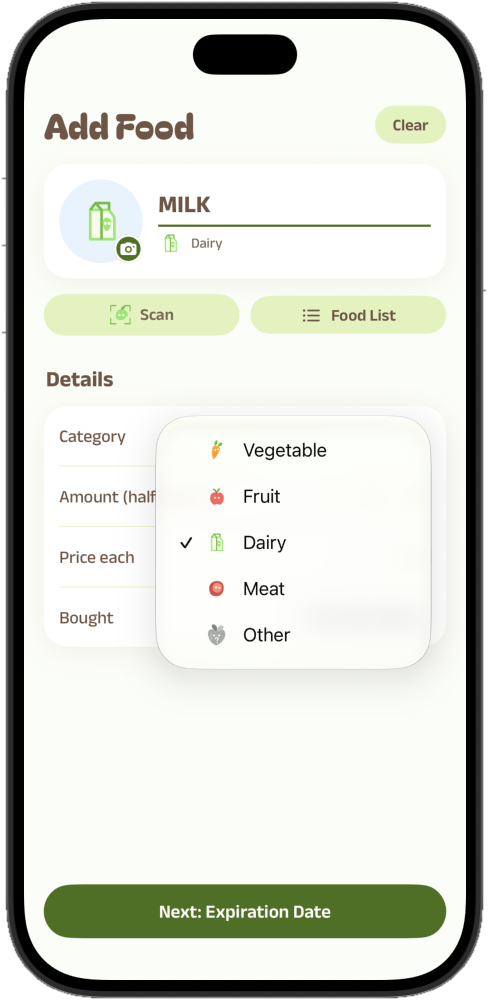
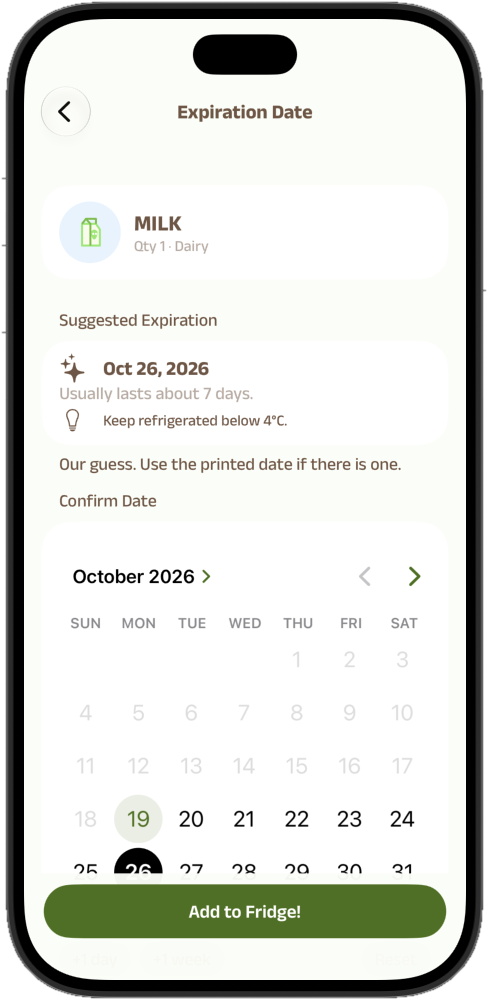
Actual iOS interface captures. Three visible states across the two-step Add Food flow.
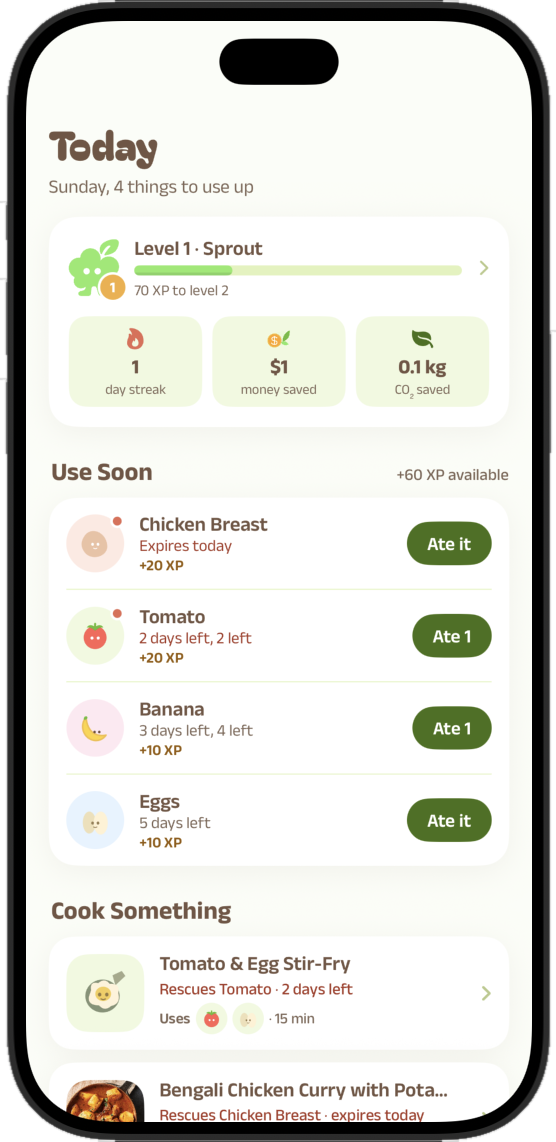
Today brings the items needing attention into a compact list with direct actions. The interface also connects the everyday task with small rewards, keeping motivation secondary to utility.
Reduce information density so users can act without scanning an oversized dashboard.
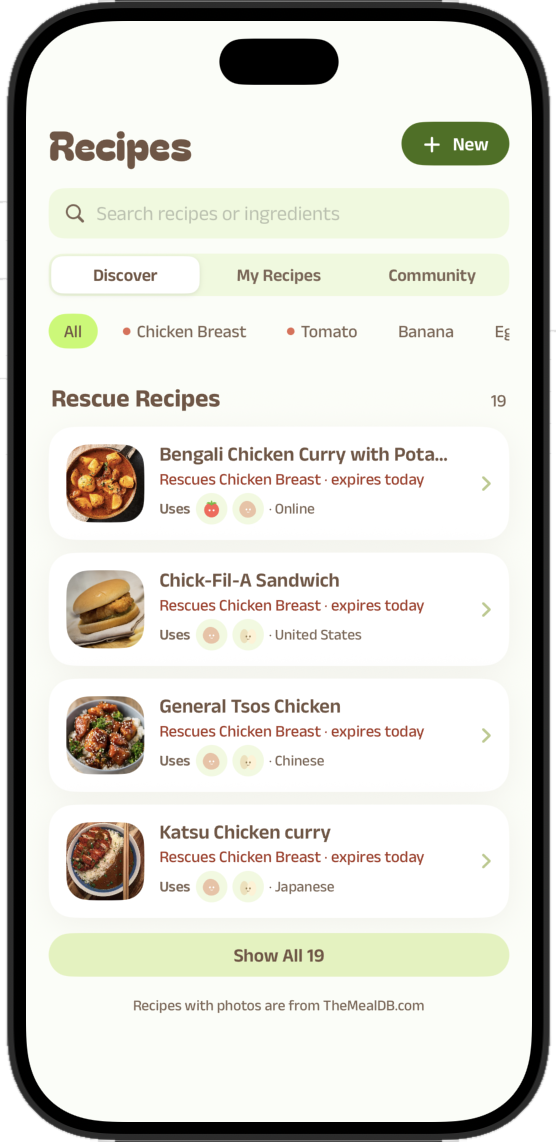
The Recipes view extends the journey beyond tracking and prioritizing. It provides a path from the food users already have to meal choices they can explore.
Recipe relevance and real-world behavioral effects have not been independently evaluated.
I implemented the initial Fridge, Today, and Recipes experiences in SwiftUI and developed the MainPages interfaces, along with Firebase Authentication. After teammates integrated their modules, we each iterated on the full app. My subsequent work included Settings, language switching, navigation, swipe behavior, haptic feedback, and a week of personal hands-on refinement. The final prototype reflects the whole team’s work.
Developed the initial layouts, core interactions, and navigation for three task-facing pages in SwiftUI.
Implemented Firebase Authentication for user login. Food inventory, recipes, and history are stored locally in the current prototype.
Added Settings access within Fridge and implemented language-switching functionality.
Standardized page transitions, refined horizontal swipe gestures, and implemented haptic feedback to provide tactile confirmation during key interactions.
I used the working app for a week, identified interaction friction, and refined the experience. Separately, feedback from a facilitated review with approximately 20 peers and faculty guidance informed the team’s navigation revision.
After photo-based AI identification proved unreliable, the team shifted toward code-based lookup and matching food records—a more predictable approach to identifying items.
Photo-based AI recognition was not reliable enough for identifying the correct ingredient.
Problem: an incorrect food match undermines the next steps.Read a packaged-food barcode or a produce-sticker PLU; match the result to food information and let users review it.
Fallback: type the food name when a code is not found.On-device reading of barcode and sticker numbers.
Open Food Facts for packaged goods; a built-in list for 56 produce codes.
Link the food to local shelf-life, price and CO₂ reference information.
Review the suggested expiration date, adjust it if needed, then save.
The app combines local reference information, free lookups and what users log themselves. Each source has a different job.
Reference shelf life, estimated price, CO₂ information and storage tips.
Local reference datasetLooks up packaged products from scanned barcodes, including names and categories.
Free external APIProvides recipe suggestions that can connect to ingredients in the fridge.
Local recipes + free APIFridge items, food history, goals and personal recipes remain local in the documented prototype.
Firebase Authentication handles login, not inventory synchronization.Days remaining determine the documented freshness state. In the Fridge, those rules become priority groups and small HP bars so users can scan which items need attention.
Watch the working iOS prototype in action. This shortened excerpt comes from a real iPhone Simulator recording of the team-built app—not a Figma animation.
My work included the initial Fridge, Today, and Recipes pages, Firebase Authentication, and later Settings, language-switching, navigation, swipe, and haptic refinements. Haptic feedback adds tactile confirmation on a physical device and cannot be felt through this screen recording. The walkthrough also shows features developed or revised by teammates.
Freshlings uses expressive, rounded forms for a friendly identity, with functional colors and reusable UI patterns to clarify freshness and next actions. This is the team's app design system, shown here alongside my SwiftUI implementation work.
A small, playful character connects the identity to the food-rescue and progress mechanics.
Bagel Fat One for playful display titles, Anek Latin for body copy, controls and numbers.
Urgency states reflect the expiration dates recorded in the app.
Soft rounded cards, pill buttons, legible status labels and compact progress feedback keep everyday actions easy to scan.

During a week of using the working Freshlings prototype, I noticed a disconnect between the physical and digital experience: cooking and eating happen away from the screen, but the inventory only stays useful when someone remembers to update it afterward. That repeated follow-up became the interaction problem I wanted to explore.
My direction: replace the expectation of immediate manual updates with a brief, optional check-in at a more natural moment. Keep the person—not an automated assumption—in control of what changes in their inventory.
I considered when the app should ask for an update and how much it can safely infer from a person's activity.
Accurate when maintained, but depends on remembering to reopen the app after cooking.
Fewer taps, but viewing a recipe or receiving an alert does not prove an ingredient was consumed.
Asks at a more suitable moment and allows Still here / Used some / Used up instead of guessing.
EXPLORED DIRECTIONAfter cooking, someone may forget to update the inventory. On their next visit, a dismissible check-in surfaces a short list of relevant ingredients. They can confirm what changed, record partial use, or skip the prompt.
Still in your fridge?
An expiry alert is useful before cooking, but asking whether food was used at that exact moment is premature. This concept separates the initial reminder from a later, optional inventory check.
They are getting close to their date.
Tap to review or update your fridge.
Let the real-world task happen first. A reminder should not demand an immediate inventory update.
Never infer consumption from a recipe view or alert. Distinguish “still here,” partial use, and “used up.”
Make the prompt dismissible and infrequent enough to support a routine rather than become another chore.
The two scenarios above are my interaction concepts, not shipped features. My next step would be to test them with people using their own grocery routines: compare the effort of updating food manually versus confirming a check-in, and learn when prompts feel helpful or intrusive.
Building a native prototype changed how I evaluate design: navigation, data handling, and feedback had to work beyond static screens. Working through implementation and everyday use helped me refine how the app supports real food-management routines.
The next opportunity is to evaluate core tasks with new participants and learn how the experience fits into longer-term routines.
Next steps: Test adding food, finding urgent ingredients, and choosing recipes with new participants; then prototype the optional post-cooking check-in and evaluate whether it reduces repeated inventory entry.